To add an online booking system to your website, first decide whether customers should book a time directly or send a request for your team to confirm. Then configure real availability, messages and cancellation rules, and test the complete process before launch. A simple form only helps if the calendar behind it stays accurate.
- Choose the right booking flow: Use direct booking for standard services with predictable availability; use a request form when the team needs to review details or confirm a time.
- Make availability reflect the real schedule: Set service durations, buffers, blocked periods, staff assignments and calendar synchronisation before publishing the booking form.
- Treat messages and policies as part of the system: Tell customers whether a time is confirmed, how to change or cancel it, and where to find appointment details.
- Test the full process before launch: Complete a test booking on mobile and desktop, then check customer messages, calendar updates and the team’s administrative steps.
Online booking system: direct booking or a request?
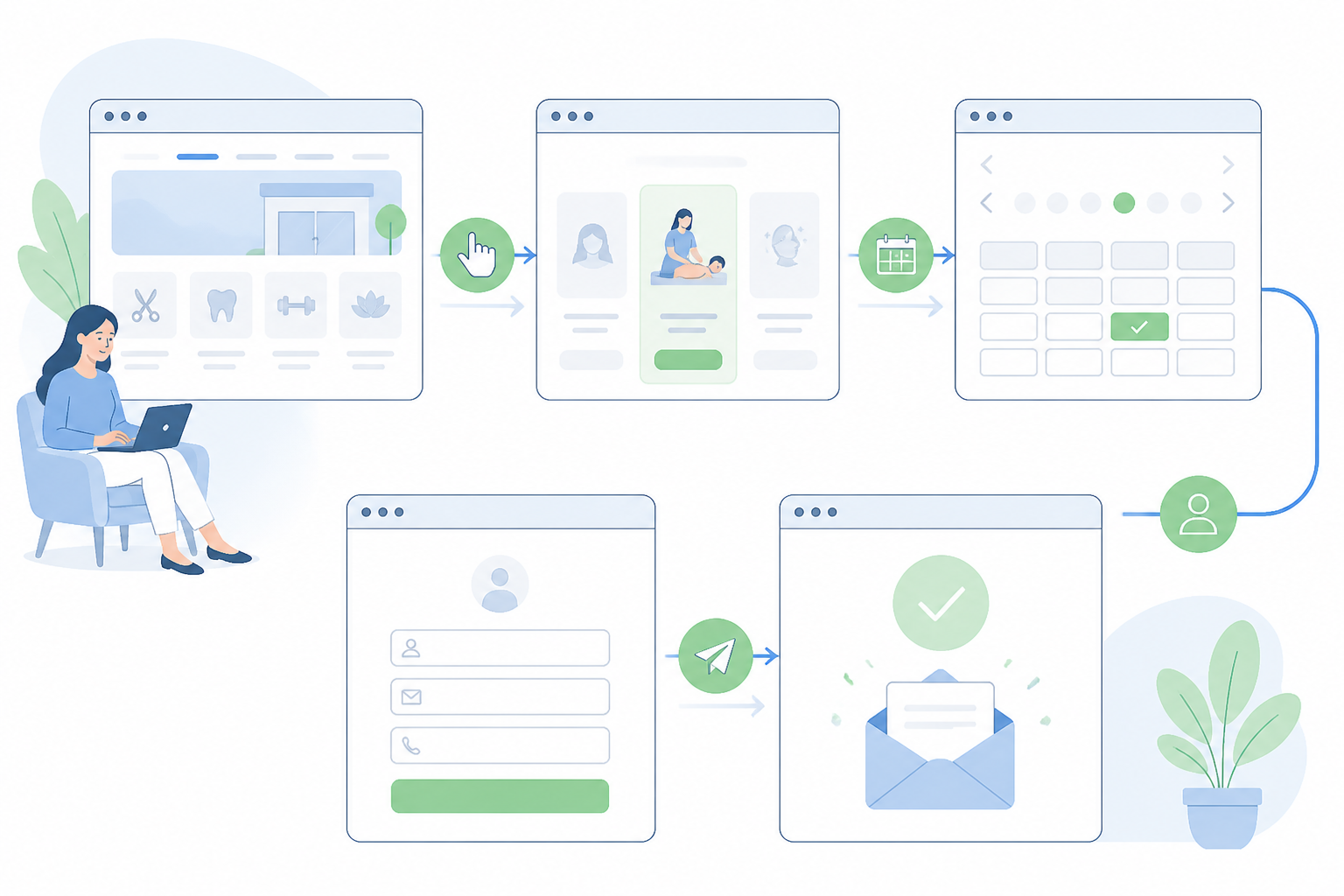
An online booking system for a website needs to do two things well: help customers find a suitable time and avoid creating confusion in the business’s schedule. The choice between direct booking and a request depends on how standardised the service is and how much manual confirmation it needs.
Before choosing a tool, list your services, their durations, who provides them and how changes are handled. These decisions affect the setup more than the form’s appearance.
When direct booking makes sense
Direct booking lets customers choose a service, view available times and make an appointment without exchanging messages. It is practical when services have predictable durations and conditions, and the calendar can be updated in real time.
Hypothetical example: a studio offers standard 45-minute sessions at set times. A customer selects a service and a slot, and the system blocks that time once the booking is confirmed. This reduces steps, but only if the schedule and rules are configured correctly.
When to use an appointment request
A request form collects a customer’s preference but does not automatically promise a time. The team checks the calendar and confirms later. This can suit complex consultations, customised services, travel-based appointments or meetings that depend on a particular specialist or an initial assessment.
The trade-off is response time: a customer may give up if the request goes unanswered. State clearly that the form is a request, not a confirmed booking, and tell customers when and through which channel the team will respond.
- Choose direct booking when services and time slots are easy to define.
- Use a request form when you need to check details before confirming.
- Do not label a request as confirmed while the team still needs to approve the time.
How to choose an online booking system
Do not start by comparing long lists of features. First define the booking scenarios: will customers choose a time themselves or send a preference? Can they select a particular staff member? Is advance payment needed? The answers narrow your options and reduce the risk of paying for features you do not need.
Inventory your services and rules
For each service, define its duration, available times, responsible staff member and any buffer needed between customers. For example, a one-hour session may need extra time for preparation or travel. If you leave that out, the system may show slots the team cannot honour.
Decide how far in advance customers can book, how far into the future the calendar opens and what happens outside business hours. The rules should reflect actual capacity, not simply fill the calendar.
Choose a solution based on integration and control
You might use a booking feature within your website platform, a connected scheduling service or a custom-built solution. Compare more than the interface: check compatibility with your site, calendar and team processes.
Check who owns the account and data, what happens if you change providers, whether you can export information and who can edit the schedule. An external tool may be quick to install, but can limit customisation or make you dependent on the provider’s account. A custom implementation gives you more control but requires design, testing and maintenance.
- Test the solution with a representative service, not only the simplest case.
- Ask to see how staff block or move an appointment.
- Check administrative access and export options before entering real data.
Configure availability and calendar synchronisation
The availability shown to customers is an operational promise. If the calendar does not synchronise or breaks are missing, a more attractive form will not fix the problem. Before launch, compare several slots in the system with the team’s actual schedule.
Connect availability to the real schedule
If your team already uses a calendar, check whether the booking tool can synchronise with it and which direction changes flow. Do not assume that connecting a calendar means full synchronisation. Some setups may import unavailable times without sending every change back.
Choose a primary calendar and a clear rule for keeping it up to date. If team members block time in several places, false availability or overlapping bookings can result. Test what happens when someone moves an event manually.
Set durations, buffers and limits
Set a separate duration for each service, add buffer time and define any capacity limits. For group activities, set the maximum number of participants; for individual services, assign slots to the right person.
Define exceptions such as days off, holidays, leave and temporary schedule changes. If managing exceptions is difficult, assign an owner and document the steps so the process does not depend on one colleague’s memory.
- Block preparation and travel time, not just the appointment itself.
- Check whether manual calendar changes update availability on the website.
- Keep a fallback procedure for temporary system outages.
Build a clear, accessible booking form
Place the form near the service description and relevant conditions. If a booking is only available after an assessment, say so before asking for details. This helps customers understand what happens next and avoids confusing initial interest with a guaranteed appointment.
Ask only for information you need
A short form is easier to complete and manage. You may need a name, contact details, the chosen service and, where relevant, a short field for useful details. Avoid collecting sensitive information if it is not needed to arrange the appointment.
Explain why you ask for each piece of information and how it will be used. If the service requires more detail, you can request it later through an appropriate channel instead of overloading the initial form.
Make the form easy to use on mobile
Many customers will open the page on a phone. Check that they can select times without zooming, tap buttons comfortably and return to a previous step without losing their entries.
Show the selected service, date and time before submission. After confirmation, provide a clear summary, including the time zone if you serve customers in other regions, the address or connection instructions, and a contact channel for problems.
- Label fields clearly and explain the format you expect.
- Do not require account creation unless the process needs it.
- Test keyboard navigation and error messages, not only the usual completion flow.
Confirmations, cancellations and communication rules
Automated messages are part of the customer experience. A system may record the time correctly yet still cause confusion if the confirmation email is unclear, arrives late or offers no way to get in touch.
Confirmations and reminders
A confirmation should say whether the time is booked or still awaiting approval. Include the service, date, time, estimated duration and steps for making changes. Check the sender name and message wording so customers can recognise it.
Reminders can help customers remember, but should be useful rather than excessive. Choose the timing and channel to suit how your customers communicate with the business, and include the information they need to attend or join.
Cancellations, rescheduling and missed appointments
Decide whether customers can change their own bookings and how late they can do so. If changes require the team’s help, provide a clear contact channel and a realistic response time. Make the policy visible before confirmation rather than hiding it in a later message.
If you collect a deposit or apply cancellation terms, explain them before booking and check the legal requirements that apply to your activity. Do not assume that a payment feature automatically handles disclosure or accounting obligations.
- Make a test booking and check the message in the inbox and secondary folders.
- Check whether cancellation releases the slot or triggers a manual review.
- Keep a record of changes and decide who handles problems.
Launch, test and improve the booking system
After launch, assign someone to check the system and decide how often to do it. Update the schedule when staff availability changes and test again after significant changes to the site or booking tool. Implementation is not complete simply because a booking button appears on the page.
Test before launch
Go through the full process as a new customer: open the service page, select a time, complete the form and check the message received. Repeat the test on a phone and a computer. Also test error cases, such as submitting an incomplete form or choosing a slot that has just become unavailable.
Then test the administrative side: find the booking, move it, cancel it and check whether the changes reach the calendar. If several employees manage appointments, ask them to follow the same procedure.
Monitor problems without jumping to conclusions
Observe whether users reach the booking page, complete the form and raise recurring questions. If you track these actions with an analytics tool, configure measurement carefully and avoid unintentionally transmitting personal data.
A low number of bookings does not automatically mean there is a technical problem. The offer, seasonality, traffic or fit between service and audience may also matter. Start with concrete checks: the form works, slots are available, messages are delivered and instructions are clear.
- Keep a checklist and a repeatable test booking.
- Record observed issues and fix errors that block confirmation first.
- Review regularly whether service details, schedules and cancellation policies are still correct.
Frequently asked questions
Should I offer direct booking or ask customers to submit a request?
Direct booking works when the service, its duration and availability are clearly defined and the calendar is kept up to date. A request form is more suitable when you need to assess the enquiry, agree on details or confirm the time manually.
Can I add online bookings without changing my website?
Often, yes. You can use an external service linked from your site with a button or link, or embedded as a component. Check that it works well on mobile, fits the site’s design and handles collected data appropriately.
How can I prevent double bookings?
Use an up-to-date source of availability and test its synchronisation with the calendar your business uses. Include preparation time between appointments, block unavailable periods and check whether manual changes are reflected in the booking system.
What information should a booking form ask for?
Ask only for information needed to organise and confirm the appointment, such as the customer’s name and contact details, the service and their preferred time. Any additional questions should have a clear purpose that you explain to the user.
What should happen when a customer cancels or does not attend?
Set out a clear procedure covering how and when to cancel, how to reschedule and what happens if someone does not attend. If you require a deposit or charge a cancellation fee, communicate the terms in advance and check the legal requirements that apply to your activity.
Conclusion
A good booking system starts with clear rules for services, availability and confirmation—not with choosing a tool at random. Decide whether you need direct booking or a request form, configure the calendar around the team’s actual schedule and test the full journey before launch. Review messages and procedures regularly so customers know what they have booked and your team can manage changes without confusion.
Related guides
Discuss your project
Planning a company website or an online store? CreareSiteOnline.ro provides website development, SEO, digital marketing and ecommerce SEO. Tell us about your objectives so we can discuss a suitable collaboration.
contact@crearesiteonline.ro · 0731 935 067
Based in Bucharest. Working with businesses throughout Romania.