To manage discontinued products in an online store, confirm that the item will not return, assess whether its page still helps visitors, then keep it, redirect it to a relevant replacement, or remove it. A temporary stock shortage calls for a different response.
- Confirm the product’s status first.: Permanent discontinuation is different from a temporary stock shortage. Verify the decision with the team responsible for purchasing or product management.
- Choose the action based on usefulness and relevance.: Keep a useful page, redirect it to a genuinely relevant replacement, or remove it when there is no lasting value or suitable destination.
- Update the whole customer journey.: Review page messaging, internal links, the sitemap, catalog data, and any connected product feeds.
- Test the result after implementation.: Check the old URL, its destination or final status, internal navigation, and mobile display. Avoid redirect chains and unsuitable bulk redirects.
What permanent discontinuation means
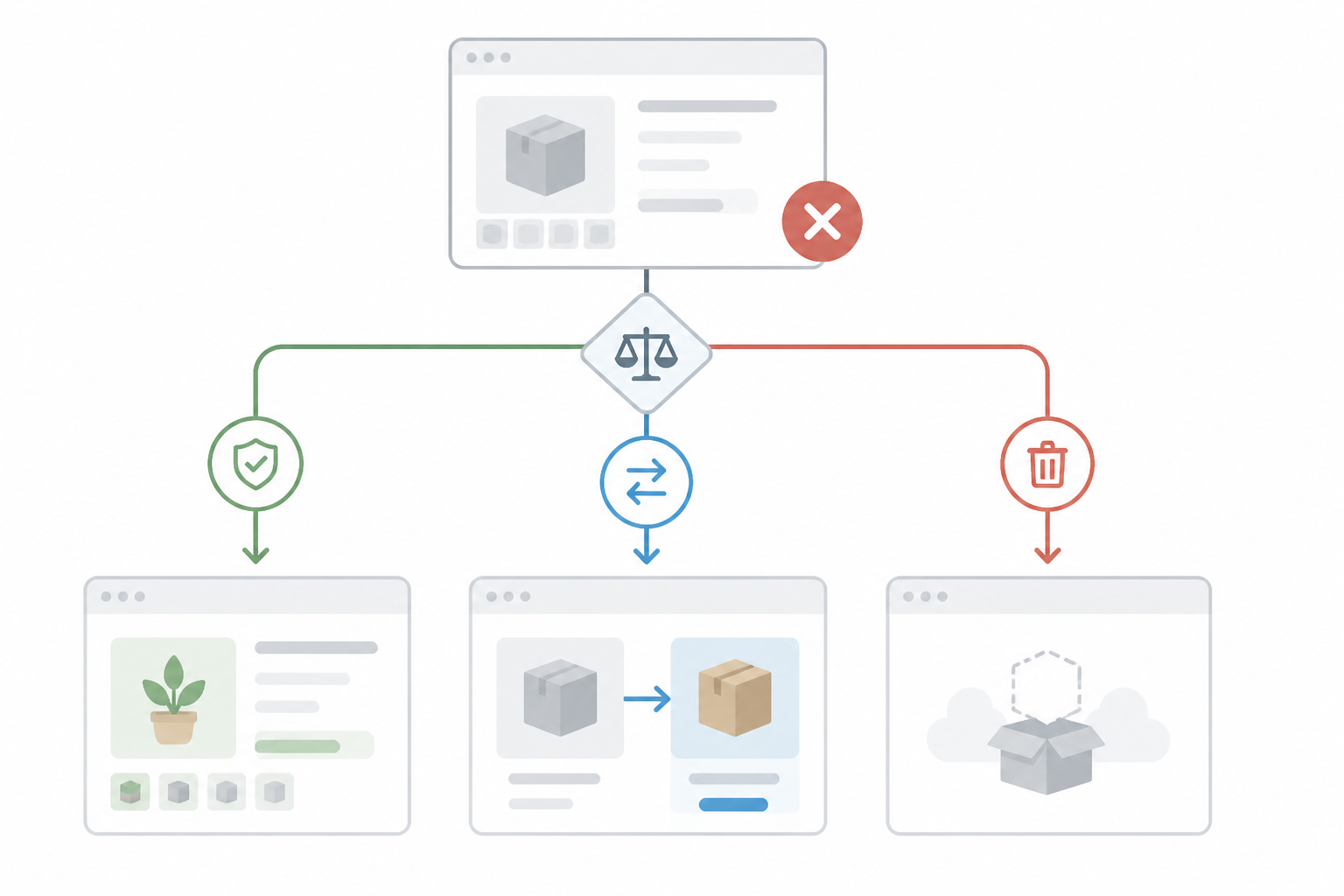
For discontinued products, keep a page only if it still helps visitors, redirect it when a relevant replacement exists, and remove it when there is no useful destination. The right choice depends on the product’s actual status, the value of its page, and how visitors reach it.
This guide explains how to choose an action for each URL and implement it without treating a temporary stock shortage as a permanent product withdrawal.
Discontinued products: confirm the status and assess the URL
Confirm the status before changing the page
A product is permanently discontinued when the store does not intend to sell it again. A supplier may have stopped offering it, a newer model may have replaced it, or the retailer may have removed it from its range. Before changing the page, confirm the status with the person responsible for purchasing or product management.
Out of stock describes a product that may be unavailable temporarily. If it is expected to return, deleting its page can remove useful information and interrupt the journey of customers looking for it. A stock quantity of zero does not, by itself, mean the product has been permanently withdrawn.
Why the distinction matters to customers
An abandoned page can show an outdated price, a non-working purchase button, or conflicting availability information. An unsuitable redirect can take visitors somewhere unrelated. Removing a page that still serves a purpose can also make a manual, specification, or replacement harder to find.
The goal is not to keep every URL at all costs or automatically delete every out-of-stock product. Give visitors a consistent answer: can the product still be bought, will it return, does it have a replacement, or is there no useful destination?
Audit the page before choosing an action
Before making a change, confirm that the product will not return and that the store will no longer sell it. Verify this in the internal catalog, with the supplier, or with the team responsible for the range. Note the withdrawal date so a later synchronization does not reactivate it by mistake.
Review the page and its role in the store
Check the URL, recent visits, impressions and clicks in Search Console, analytics traffic, historical orders, links from other websites, and links from categories or articles. These indicators can help you assess the page, but they do not determine the correct action on their own.
Review the content too. Does it include an original description, technical details, instructions, useful FAQs, or reviews? A page can still be a valuable reference for existing customers even when the product is no longer for sale. Other pages may contain little beyond an expired offer and a title.
Record the decision
For each URL, record the product’s status, the action chosen, the reason, the redirect destination if there is one, and who approved the change. A simple table helps prevent mistakes when several products are withdrawn at once.
Check whether product variants have separate URLs or share one page. Do not base the decision only on the quantity shown in inventory, and record the reason for each redirect.
- Do not decide based only on the stock quantity.
- Check whether product variants have separate URLs or share a page.
- Record the reason and destination for every redirect.
Discontinued products: keep, redirect, or remove?
Keep the page when it still answers a need
Keeping the page can make sense when it explains what happened and offers information that remains valid. For example, a withdrawn product may still have a manual that current owners need, or details that help customers check compatibility with other items.
Make the status clear. Remove the purchase button if the product cannot be bought, and say that it has been discontinued—not merely that it is unavailable—when that is the truth. Show close alternatives without claiming they are identical if important differences remain.
Hypothetical example: a store discontinues a printer model but keeps its specifications and manual for existing owners. Its page can point to a successor and explain differences in consumables or connectivity.
Redirect only when the destination is relevant
A permanent redirect may be appropriate if a product has been replaced by an equivalent model and the old page no longer needs to stand alone. The destination should be accessible and serve a similar purpose, not simply belong to the same broad category.
For example, the next model in a product line may be a logical destination when it directly replaces the discontinued version. If the products differ considerably, it may be more accurate to keep an explanatory page or redirect to a well-chosen category where visitors can compare options.
Do not automatically redirect all discontinued pages to the homepage. If there is no real equivalent, that destination does not help visitors find what they came for.
Remove the page when it no longer serves a purpose
If the product will not return, has no relevant successor, and its page contains no useful information, removal may be the clearest option. Configure the server to return an appropriate not-found response rather than displaying an empty page that looks functional.
Before removing it, check whether the URL appears in campaigns, emails, internal links, or printed materials. Update the sources you control and keep a record of the decision. If the product later returns, you can reassess the page.
- Keep the page if it contains information that helps existing customers.
- Redirect only to a destination that is relevant to the visitor.
- Remove expired content that has no continuing use or suitable successor.
Update retained pages without misleading customers
Make the status and options clear
State near the main product information whether the item has been discontinued or is temporarily unavailable. Do not hide this in a note at the bottom of the page, and do not promise that it will return unless that has been confirmed.
If alternatives are available, briefly explain how they differ, such as in size, compatibility, features, or price range. Avoid claims you cannot support. A restock notification may suit a product that is expected to return, provided the feature is available and working. Offering one for a permanently discontinued item would create a false expectation.
Make sure the price and purchase button reflect the product’s actual status.
Keep only accurate, useful content
Review the title, description, images, product data, and structured information so they do not imply current availability or pricing when these details are no longer valid. Retain content that genuinely helps visitors and can still be presented accurately.
You can link to the successor model and the relevant category. If there are several options, offer simple selection criteria instead of an unstructured list. Use precise wording: “permanently discontinued” and “temporarily out of stock” do not mean the same thing, and an old price should not appear to be a current offer.
- Do not show an old price as though it were current.
- Recommend a replacement only when it is relevant to the customer.
- Use distinct wording for permanent discontinuation and temporary unavailability.
Implement the change and verify the result
The technical implementation should match the decision. A well-updated page is not enough if internal links lead to an error, and a helpful redirect can still fail visitors if its destination no longer works.
Implement redirects carefully
Set up the redirect at the server level or through the feature provided by the store platform. For a permanent move, use an appropriate permanent redirect and test the old URL on both mobile and desktop. Confirm that the destination loads normally and does not create a redirect chain.
If you use a plugin or app, check for conflicting rules and keep a record of the changed URLs. A rule applied too broadly can affect more pages than intended.
Clean up links and catalog data
After choosing an action, update links in categories, recommendations, filters, articles, and campaign pages. Remove discontinued URLs from the sitemap when they are no longer active pages you want to present for discovery. If you send product feeds to external channels, check those too.
If inventory syncs automatically with the store, establish how the “permanently discontinued” status is transferred. Otherwise, a later synchronization could reactivate the product or change its message.
Test the result and review it over time
Open the old URL and confirm that it produces the intended result: an updated page, a suitable destination, or a not-found response for removed content. Check internal links, navigation, and mobile display. In Search Console, you can monitor for access problems or unexpected changes, without assuming that reports update immediately.
Include discontinued products in periodic catalog checks. Reviews during product imports or before major campaigns can uncover incorrect stock messages, recommendations to removed URLs, and outdated redirects. Where possible, test each kind of change in a controlled environment first. Check URLs with many internal links or visits separately.
- Avoid redirect chains and loops.
- Test each type of change before applying it broadly, if your platform allows.
- Pay particular attention to URLs with many internal links or visits.
Avoid common mistakes and create a repeatable process
A useful rule is not “delete old products,” but “confirm the status, assess the page, and then choose the most useful outcome.” Applied consistently, this helps prevent misleading pages while keeping information available when it still serves customers.
Common mistakes to avoid
The first mistake is deleting every product that is out of stock. Some items are only waiting for a delivery, and their pages may remain useful. The second is leaving discontinued products unchanged, which can make visitors think they can place an order.
Another mistake is redirecting many pages to an unrelated category or the homepage. Choose a destination for each URL after comparing the discontinued product with what visitors will find there. Do not change a URL merely because its product has been withdrawn; if the page remains active and useful, its existing address may still be appropriate.
Make the process repeatable
Decide who confirms that a product has been discontinued, who chooses the action for its URL, and who checks the implementation. In a larger store, these responsibilities may sit with purchasing, catalog management, and the technical team.
Use a checklist that records product status, confirmation date, page value, relevant visits and links, available alternatives, chosen action, and test result. This makes decisions repeatable and easier to revisit if the product range changes.
- Do not confuse a discontinued product with a temporary stock shortage.
- Do not use redirects as a universal solution.
- Revisit the decision if a successor appears or the product returns to the range.
Frequently asked questions
What should I do with a discontinued product page?
Choose based on the page’s usefulness and whether a relevant alternative exists. Keep it with accurate information, redirect it to a suitable replacement, or remove it if it no longer serves a purpose and there is no appropriate destination.
Is it enough to mark a product as unavailable?
Not always. If the product may return, explain that its stock is temporarily unavailable. If it has been permanently discontinued, say so clearly and provide relevant alternatives, redirect the page, or remove it as appropriate. Do not leave the page suggesting that customers can place an order when they cannot.
When should I redirect a discontinued product page?
Redirect it when there is a destination that makes sense for visitors, usually an equivalent product or a relevant category. Do not automatically redirect every discontinued URL to the homepage; the destination should match the visitor’s likely intent as closely as possible.
What should I do if a product is only temporarily out of stock?
Keep its page active if the product is expected to return, and communicate the temporary stock shortage clearly. Give a return date only if you can support it. You can also offer a restock notification, if the feature works, or show comparable products.
Should I remove a discontinued product page from the sitemap?
Keep the sitemap consistent with the pages you want to present as active. If a page has been removed or redirected, update the sitemap accordingly. Also check internal links that still point to its old URL.
How can I tell whether a product URL still gets visits?
Use available analytics and Search Console reports, if they are configured for your site. Consider clicks, impressions, referral traffic, conversions, and internal links together. No single metric should automatically determine what happens to the page.
Conclusion
For each permanently discontinued product, first confirm that it will not return, then assess the page’s value and whether a relevant alternative exists. Keep the page if it provides useful information, redirect it to a suitable successor, or remove it when it no longer serves a clear purpose. Update messages, links, and the sitemap, then test the result. A considered decision helps customers find accurate information and keeps the catalog consistent.
Further reading
Discuss your project
Planning a company website or an online store? CreareSiteOnline.ro provides website development, SEO, digital marketing and ecommerce SEO. Tell us about your objectives so we can discuss a suitable collaboration.
contact@crearesiteonline.ro · 0731 935 067
Based in Bucharest. Working with businesses throughout Romania.