Internal site search helps online store visitors reach products faster when they know a name, attribute, or need but do not know which category to browse. Make results easy to compare, handle spelling variations carefully, and give shoppers useful next steps when nothing matches. Reviewing search terms and behavior can also reveal products that are difficult to find. Internal search supports navigation within the store; it is not the same as getting pages indexed in Google.
- Make results easy to compare.: Show relevant product details, such as the name, image, price, availability, and attributes that distinguish similar options.
- Handle variations without changing the shopper’s intent.: Use carefully maintained synonyms and typo tolerance, while keeping the entered term visible and letting shoppers adjust it.
- Treat no-result searches as a workflow.: Check the catalog, product data, and search rules before offering alternatives, and record recurring terms for investigation.
- Analyze behavior, not just search volume.: Clicks, repeated searches, and subsequent actions can help identify problems with results, catalog data, or product descriptions.
- Keep internal search separate from Google indexing.: Internal search supports store navigation; indexing concerns how search engines discover the store’s public pages.
Internal site search for online stores: purpose and limits
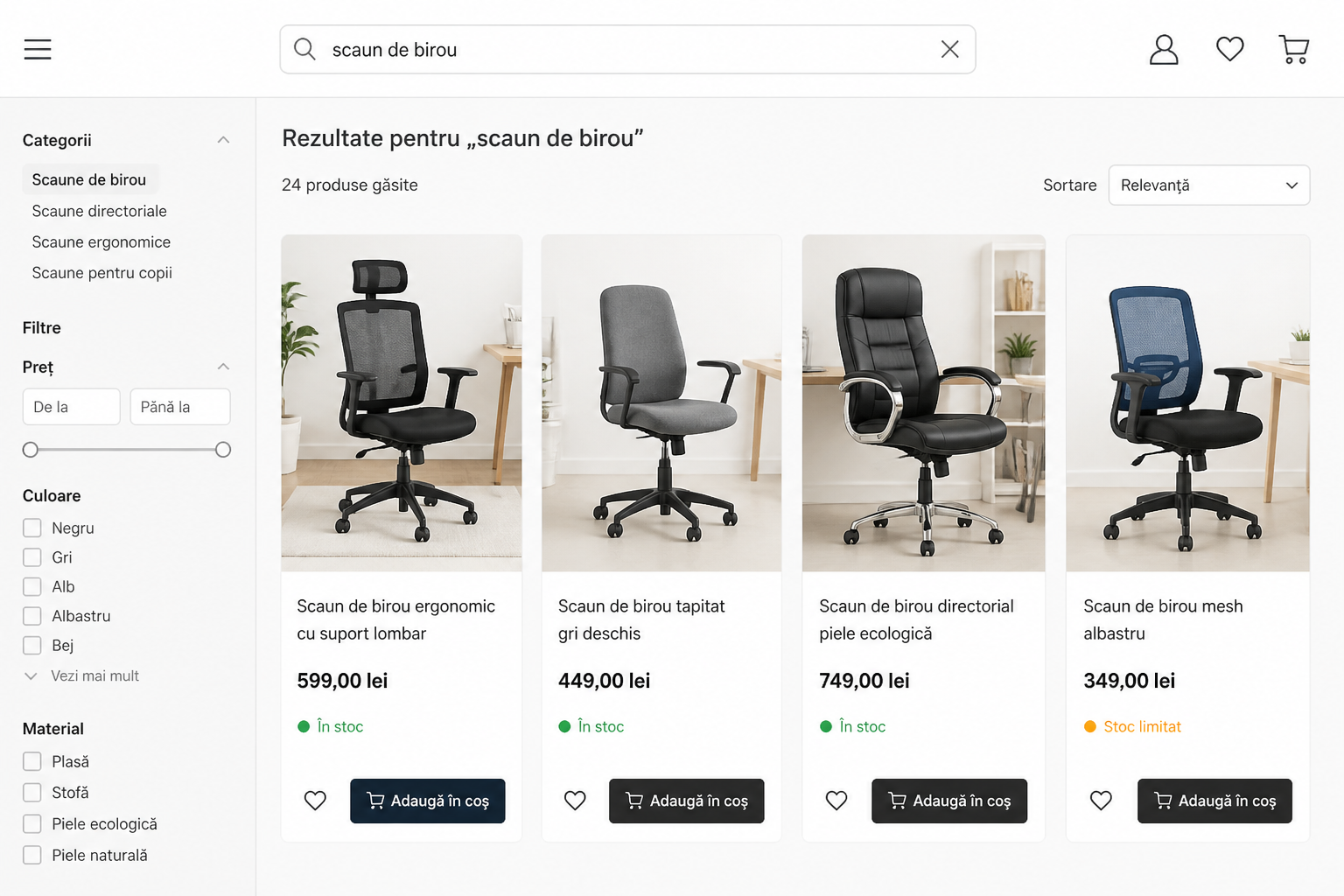
Internal search helps visitors reach products when they know a name, attribute, or need but do not know where to browse. To make it useful, provide results that are easy to compare, handle spelling variations carefully, and give shoppers clear next steps when nothing matches. Then review search terms and behavior to find products that are hard to discover.
What problem does internal search solve?
Internal search is especially useful when visitors have a rough idea of what they want but do not know which category contains it or what name the store uses. In a large catalog, search can shorten the route between a shopper’s intent and a product page.
A visible search box is not enough. What happens after someone enters a term matters: how quickly results appear, whether they are relevant, and whether the shopper can tell why a product might be a good match.
How it differs from Google search
Internal search works within the store and generally uses its catalog to suggest products. Google indexing concerns how a search engine discovers the store’s public pages. These are different functions, with different goals and configurations.
Internal search results do not automatically become valuable category pages for Google. Indexing also depends on factors such as site navigation and which pages the store makes accessible. Do not turn every search term into an indexable page without a clear editorial and technical reason.
- Evaluate the search experience for visitors separately from the site structure intended for organic discovery.
- Use a separate SEO approach to review product and category pages.
What should internal search results show?
The goal of a results list is to reduce the effort of comparison. Prioritize the information that helps answer a practical question: Is this the product I am looking for, and can I order it?
Choose what information appears in results
A result should help shoppers make a quick decision. Depending on the product type, show its name, image, price, and availability. You can also include a distinguishing attribute, such as capacity, size, color, material, or model. Choose details that help customers tell similar variants apart.
If the list is too crowded, shoppers may have to open every product just to see how the options differ. If it is too sparse, they may not know which result is worth opening. Test the results page with similar products, not only with items that are obviously different.
Set result order and availability rules
Relevance to the search term should be the primary ranking consideration. You can then consider availability, orderable variants, or other criteria that help the customer. Do not let low-stock or promoted products appear first if they do not match the search.
Decide explicitly how out-of-stock products should be handled. Some stores hide them; others keep them visible to show alternatives or provide useful information. Either way, availability should be clear and consistent with inventory data.
Use suggestions as people type
Suggestions can shorten the process when they appear quickly and are easy to use on mobile. They might include relevant products, categories, or frequently searched phrases. Limit the list to distinct options that are easy to scan and connected to the entered term.
Do not assume every visitor wants a suggestion selected automatically. Keep full search accessible and ensure people can navigate the suggestion list with a keyboard, not only a mouse.
- Check search results on both small screens and desktop.
- Make availability consistent with the product page and ordering process.
How to handle typos and synonyms in internal site search
Search should recognize how customers refer to products without silently replacing their intent. Careful synonym and typo rules can improve matching, but they need to be checked against real catalog data.
Synonyms, abbreviations, and spelling variations
Customers may use a different term from the one in the catalog: a synonym, abbreviation, common product name, or part of a product code. A controlled vocabulary of related terms can connect searches to the right products without changing the official product name.
For example, an electronics store might treat “wireless headphones” and “cordless headphones” as expressions of the same intent. This is a hypothetical example: a store should validate the association against its own catalog and customers’ language.
Correct spelling mistakes carefully
Typo-tolerant search can recognize versions with missing, transposed, or extra letters. However, automatic correction can change the meaning, especially for model names, codes, and sizes. For unclear terms, it is safer to suggest an alternative and let the shopper choose.
Show which term the search interpreted and offer a way back to the original phrase. If a product code returns no results, check the catalog and code formats before assuming the shopper made a typing mistake.
Manage synonyms with rules, not guesswork
Keep a record of approved associations: the entered term, recognized alternatives, relevant category, and review date. Revisit associations that return unsuitable products or combine different search intents.
Do not add a synonym just because two words look alike. If a term could refer to different products, offer category suggestions or use filters to help the shopper provide more context.
- Test expressions with and without diacritics, as well as common customer wording.
- Keep a set of test searches for product codes, names, and variants.
What to do when a search returns no results
A no-results page should not be a dead end. First find out whether the issue is with the catalog or the search setup, then offer an action that helps the shopper continue.
Investigate before showing alternatives
A “No results found” message can have several causes: the product is missing, the catalog uses a different name, a filter excludes the product, or the search index has not been updated. Before recommending other products, check whether the requested item exists and is configured correctly.
Keep the entered term visible in the message. Offer concrete actions, such as checking the spelling, simplifying the phrase, removing a word, or browsing a related category.
Recommend a useful next step
Alternatives should have a clear connection to the search intent. You might show related categories, substitute products, or a route to customer support. Avoid generic recommendations that do not reflect the term entered.
If a product is temporarily unavailable, a useful message can explain its status and, if the store offers the feature, allow the shopper to request a notification. Do not promise restocking or give an estimated date unless that information is confirmed.
Use recurring searches to improve the catalog
If many shoppers search for a product that exists but cannot find it, the problem may be its name, attributes, category, or missing synonyms. If the product does not exist, the volume and relevance of searches can help the team decide whether to expand the catalog.
Hypothetical example: repeated searches for “clamp desk lamp” return no products, although the store sells lamps with that feature. The team could check whether the “mounting type” attribute is complete and whether the phrase is associated with the relevant products.
- Explain the problem and offer actions that keep the customer in the store.
- Distinguish products that are absent from the catalog from products that exist but are difficult to discover.
What data can reveal hard-to-find products?
Search data can help identify products that are hard to discover, but it needs context. Use behavioral signals to guide investigation, then check actual searches and products before deciding what to change.
Record a useful set of events
To evaluate search, record the term entered, whether results appeared, clicks on products, and relevant actions that follow. If your tools and privacy rules allow it, you can also track whether a shopper refines a search or abandons the flow.
Collect only the data you need and review how it is stored and accessed. Search terms can contain unexpected information, so do not automatically treat them as non-sensitive data.
Interpret signals together
A search with no results is a signal to investigate, not a conclusion. Compare it with inventory, similar terms, and the catalog structure. Few clicks may point to irrelevant results, but they may also indicate a difficult-to-read list or insufficient comparison information.
Look for patterns rather than isolated cases: frequent terms, repeated searches for the same need, and products shoppers reach only after several attempts. Then manually inspect examples to understand what the data may indicate.
Turn observations into actions
Group issues into categories: missing product, missing synonym, incomplete attribute, typo, irrelevant result, or unclear stock status. Assign an owner to each category and plan a follow-up check, such as retesting a phrase after updating the catalog.
You can compare behavior before and after a change, but account for seasonality, campaigns, and stock changes. An observed association alone does not prove that one change caused the outcome.
- Review search terms periodically and prioritize recurring problems.
- Keep concrete test examples, not just aggregated reports.
How to maintain useful internal site search
Reviewing search can be part of routine store checks, especially after product imports, catalog changes, a category launch, or updates to the search feature.
Create a search test set
Include exact product names, synonyms, short terms, codes, common misspellings, searches with and without diacritics, out-of-stock products, and phrases that should not return products. Check whether results match the intent and whether messages are clear.
Test different ways of using the feature too: searching on mobile, navigating with a keyboard, using a screen reader, and returning to previous results. The search field, suggestions, and no-results state should be understandable and operable.
Decide who maintains the rules
Search can deteriorate when catalog data changes but synonyms, filters, and ranking rules do not. Decide who corrects product names and attributes, who approves term associations, and who checks functionality after technical updates.
If the store syncs products and stock with an inventory system, check the data flow: how often it updates, which fields are transferred, and how errors are reported. Good search configuration cannot compensate for an incomplete or outdated catalog.
- Test search after important catalog updates and changes to the platform.
- Compare search results with inventory and the information on product pages.
Frequently asked questions
What should appear while a customer is typing in the search box?
Show relevant products with a clear route to their product pages. Depending on the catalog, suggestions may also include categories or search phrases. Keep the list easy to scan and avoid options unrelated to the term entered.
How should I handle searches with no results?
Keep the search term visible, explain that no results were found, and offer useful next steps: check the spelling, remove a word, visit a related category, or contact the store. First check whether the product exists under a different name, variant, or category.
Should out-of-stock products appear in search results?
That depends on the store’s policy and whether showing the product helps the customer. You can hide it, show it with a clear availability status, or display alternatives. Do not present a product as available if it cannot be ordered.
Does internal search help a store get indexed in Google?
Not directly. Internal search helps visitors navigate the store. Google indexing concerns the accessibility and structure of pages, internal links, and other technical and editorial factors. Internal search results should not be confused with product or category pages that the store wants Google to discover.
What data is worth tracking for internal search?
Track search terms, searches with no results, clicks on products, and relevant follow-up actions, such as adding a product to the cart. Interpret these signals in context: a search with no click could mean the results are irrelevant, but it could also mean the results page lacks information customers need to decide.
Conclusion
Useful internal search combines results that are easy to compare, controlled tolerance for spelling variations, clear messages when results are missing, and data that helps the team investigate problems. Start with a focused set of real searches, check whether the products match the intended terms, and update catalog data where you find gaps. Treat search as part of the shopping experience, not as a substitute for site structure or page indexing in Google.
Further reading
Related guides
- How much does a website cost in 2026? Complete budgeting guide
- Business website development: complete guide for companies
- WordPress or a custom website? Practical comparison for 2026
Discuss your project
Planning a company website or an online store? CreareSiteOnline.ro provides website development, SEO, digital marketing and ecommerce SEO. Tell us about your objectives so we can discuss a suitable collaboration.
contact@crearesiteonline.ro · 0731 935 067
Based in Bucharest. Working with businesses throughout Romania.